penguins-gui
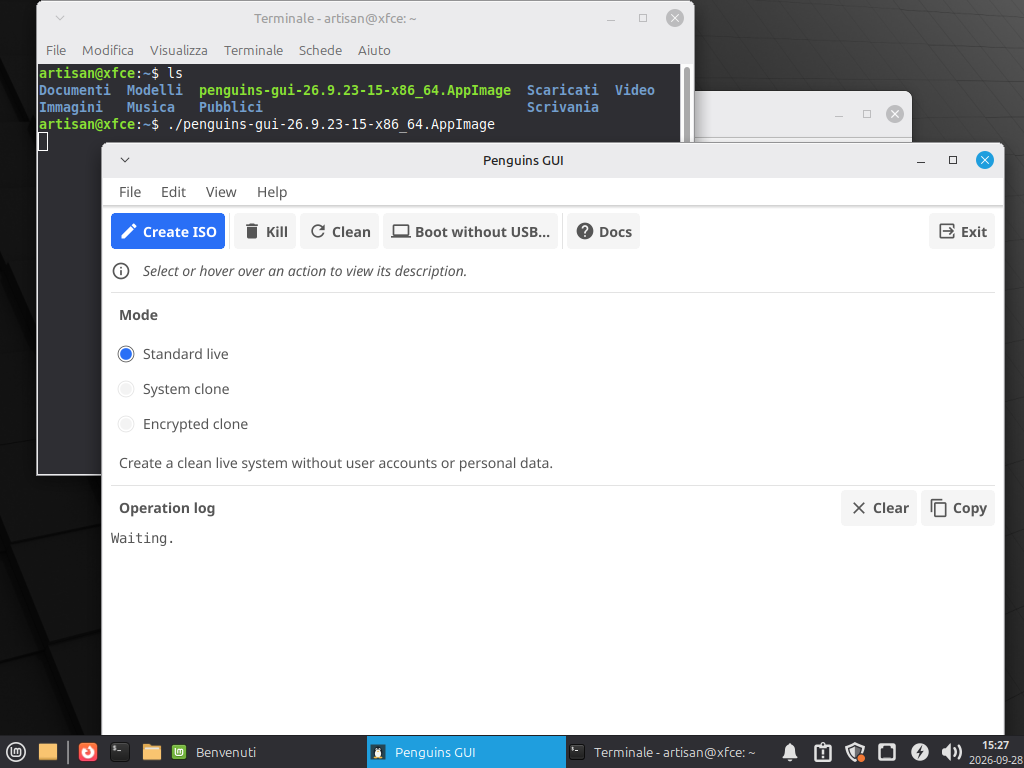
penguins-gui is a minimal, independent desktop Graphical User Interface (GUI) for Penguins' Eggs, developed in Go using the modern cross-platform Fyne toolkit.
It brings the power of eggs remastering directly to desktop environments, enabling users to launch remastering flights, monitor live execution logs, configure encryption passphrases visually, and run system setup tasks without touching the command line.
📦 Installation & First Start
You can start with penguins-gui, even if penguins-eggs is not installed yet:
- Download the penguins-gui AppImage or the package for your distribution from the latest release.
- For the AppImage, make the downloaded file executable (
chmod +x penguins-gui-*.AppImage) and open it. For a native package, install it using your distribution's package manager. - Launch penguins-gui and select Install penguins-eggs CLI from the Edit menu.
The GUI will configure the appropriate package repositories and install penguins-eggs for you. Once installation is complete, you can start creating your live ISO directly from the GUI.
🏗️ Architectural Placement
penguins-gui is designed with strict modular separation:
penguins-gui (Desktop GUI) -> eggs (CLI) -> coa (Go Orchestrator) -> oa (C Engine)
- Zero Coupling:
penguins-guidoes not importeggsinternals. It operates strictly by orchestrating the official CLI and system utilities. - Privilege Separation: Ordinary desktop sessions run as standard user space. Only the underlying commands requiring system mutations are elevated via
pkexec(Polkit) orsudo. - Independent Lifecycle:
penguins-guican be launched even on a fresh system wherepenguins-eggshas not yet been installed.
🚀 Core Features
1. Remastering Flights
From the main window, users can select one of three remastering modes and initiate the flight with a single click:
- Standard Live: Produces a clean, bootable live hybrid ISO with standard live credentials.
- System Clone (
--clone): Captures the running system, preserving real user accounts, credentials, and/homedata. - Crypted Clone (
--crypted): Generates a LUKS2-encrypted squashfs live image (Debian family). A dedicated graphical dialog prompts for the passphrase, automatically passing it viaEGGS_LUKS_PASSPHRASE.
2. Live Execution Stream & ISO Discovery
- Real-time Terminal Output: Displays unified standard output and error streams in a live scrolling terminal view with Clear and Copy actions.
- Artifact Discovery: Once the build completes, the GUI scans
/home/eggs, identifies the generated.isoimage, and provides an Open ISO Directory button to open the folder directly in your desktop file manager viaxdg-open. - Process Guard: Prevents closing the window while a remastering flight is actively running to avoid orphaned chroot mounts.
🛠️ Automated Setup & Package Management
The Edit menu provides integrated helpers that make preparing a remastering host seamless:
📥 Install penguins-eggs CLI
- Can be invoked on a machine before
penguins-eggsis installed. - Automatically configures the official repository and signing GPG keys for your distribution (Debian/Ubuntu, Arch/Manjaro, Fedora, openSUSE, Alpine).
- Refreshes package caches and installs the
penguins-eggspackage. - The GUI detects the new CLI immediately and unlocks remastering actions without requiring a restart.
🎨 Install Calamares (with Qt5/Qt6 Runtime Discovery)
- Installs the standard Calamares installer package via the native package manager.
- Inspects the installed Calamares binary using
lddto determine whether it is built against Qt 5 or Qt 6. - Automatically pulls and installs the matching QML and Quick Controls runtime dependencies required for smooth slideshows (supporting
slideshowAPI: 2).
⚙️ System Utilities & Maintenance
- Update /etc/skel (
eggs tools skel): Clones the visual and shell configuration of the current user into/etc/skel, ensuring new users and live sessions inherit the exact look and feel of the desktop. - Configure grub40 (
eggs tools grub40): Generates or updates GRUB loopback configuration in/etc/grub.d/40_customto boot ISO images directly from the local hard drive. - Clean System (
eggs tools clean): Cleans active logs and package manager caches (apt/pacman). - Destroy / Kill (
eggs destroy): Safely unmounts virtual filesystems (MNT_DETACH) and wipes temporary build nests after an interrupted flight.
📋 Requirements
- Operating System: Linux with an active X11 or Wayland desktop session.
- Authentication: Polkit (
pkexec) orsudofor administrative actions. - Graphics & Toolkit: OpenGL-capable display driver and distribution dependencies for Fyne.
- Dependencies:
curl,gpg(on Debian family), andeggs(can be installed via the GUI menu).
💻 Source Code & Packages
- Source Repository: https://github.com/pieroproietti/penguins-gui
- Local Development:
git clone https://github.com/pieroproietti/penguins-gui.gitcd penguins-guigo mod tidygo run .
- Native Packaging:
Supports building native distribution packages (
.deb,.rpm,.pkg.tar.zst):make buildmake package